Second Copy

Download Second Copy

Download Second Copy
Sponsored Links

Second Copy


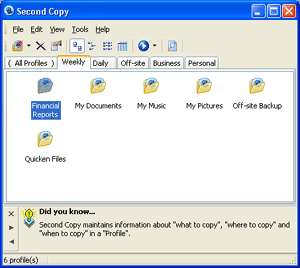
Second Copy copies files and folders from one location to another on the same drive, another drive or across the network. You can setup "profiles" that describe the source location, the destination location, and the frequency at which you want to copy the files. Second Copy monitors the source files for changes or additions and then automatically copies the new or changed files to their designated destination. An easy to use setup profile Wizard, makes configuration job a snap. Advanced options include PKZIP compatible compression, password protection, AES encryption, two-way directory synchronization and background thread priority control. You can also include or exclude specific file or sets of files from the copy and keep up to 25 old versions of files. Once you configure the profiles with your important file locations, the program sits as an icon in Windows "system tray" and unobtrusively copies files in the background. Copy files using FTP. Sends email notification after backup. Can be used to synchronize files between the desktop and laptop, or between two remote sites. Also useful for distributing software to several PCs on the network.

Second Copy Review
Website Centered Systems
Screenshot View Second Copy Screenshot
Cost $29.95 US
Release Date 2006-03-02
OS Win95,Win98,WinME,WinNT 4.x,Windows2000,WinXP,Windows2003
Requirements Win9x/ME/NT4/2000/XP/2003
File Size 2117 KB
Install Support Install and Uninstall
Type Shareware
Version 7.0
Tags automatic backup encryption ftp compress synchronize copy AES 256-bit

More Popular Backup-Utilities Titles
WinRescue 98
Four Tools in One: Crash Fixer, RegPack, File Backup, and Troubleshooter. Don't spend hours reinstalling Windows 98, restore in minutes with WinRescue 98. WinRescue 98's tools protect you against crashes. More details at www.superwin.com

Syncronize Backup
Syncronize Backup (Standard Edition) is a powerful software to protect your data. There are 2 different modes: Backup and Synchronization. This is very easy to configure and offer the maximum flexibility. You can try it for 30 days.

File Uploader
File Uploader is an easy and affordable solution to store any kind of PC files on Palm. Forget floppies, CDRW or any type of storage device. Just drag the files on windows application provided, sync your Palm and You have files on Palm or vice versa.

Software Downloads
Software Downloads
 
Top 10 Searches
1spyware
2mpeg
3dvd burner
4kazaa
5ares
6freeware
7fax software
8anti spam
9privacy
10anti virus
Accounting
ActiveX Controls
Application Add-Ins
Audio & Sound
Automation Tools
Backup Utilities
Bar Coding
Business
CAD
Calendars
CD-ROM Players
Chat Clients
Clipboard Utilities
Communications
Compression Tools
Conferencing
Database Management
Database Tools
Desktop
Desktop Applications
Desktop Managers
Disk Management
Education
E-Mail Clients
E-Mail Tools & Utilities
Encryption & Security
Engineering
FAX Programs & OCR
File Management
Financial Tools
Fonts
FTP Clients
Games
Games - Action
Games - Board
Games - Card
Games - Educational
Games - Kids
Games - MAC
Games - Puzzle
Games - Strategy
Games - Win95
Games - Word
Graphic Converters
Graphic Editors
Graphic Filters & Plug-Ins
Graphic Utilities
Graphic Viewers
Hobbies
Home & Lifestyle
HTML Editors
Internet
Java Authoring
Mailing Lists and Labels
Memory & Benchmark
Micellaneous Applications
Multimedia Viewers
Music Tools
Net Conferencing
Networking
Newsreaders
Offline Web Readers
PIMs
Power Toys
Printer Utilities
Programming - C/C++
Programming - CGI
Programming - Databases
Programming - Delphi
Programming - JAVA
Programming - Perl
Programming - VB
Programming - WinSock
Programming
Religion
Remote Computing
Screensavers
Server Daemons
Shell Enhancement
Stock & News Tickers
Telephony
Terminal & Telnet Clients
Text Editing
Time Synchronizers
Toolbar Utilities
Virus Scanners
Wallpaper
Web Browsing
Web Cache Utilities
Web Organizer
Web Security
Web Site Promotion
Web Submission
Word Processing
Download Second Copy From Software Vault