Digital Document Manager 2.5
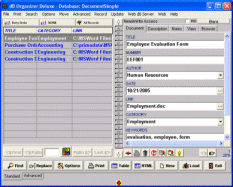
Digital Document Manager is a simple to use electronic document management software for Windows. Our software makes it easy to catalog, organize, and keep track of virtually any type of information about your electronic documents. You can start using our software with the database solutions included in the software. If the database template already created is not exactly what you are looking for you can easily create a new one with the Designer. Flexible search engine finds any keyword or phrase in your database. Sort your entries on any field, e.g. on document title, folder name, document name, author, category, ....You can create new entries from predefined templates, copy/paste similar records within the same database, copy records from another database. Report wizard lets you create reports, summaries, and more. You can save settings to a template for future reuse. There is no limit on the number of document records you can add and the number of databases you can manage. Each member of your organization can have separate accounts with unique digital document database solutions. Program is network compatible. There are more than 100 other personal or business database solutions that can be used with this software.
Download Digital Document Manager 2.5
Product Info
Download Digital Document Manager 2.5
Publisher: PrimaSoft PC
Size: 9.5 MB
OS: Win95,Win98,WinME,WinNT 4.x,Windows2000,WinXP,Windows2003
Install: Install and Uninstall